Bookkeepers
Catch-up and clean-up work when the client sends twelve PDFs and no bank feed. Client data stays on your computer.
 Statement Unpacker
Private bank statement converter
Drop in a bank or credit card statement. Get every transaction as a clean spreadsheet, checked against the statement’s own balances. The file never leaves your computer.
Tested on real statements from Chase, Bank of America and Capital One. Most other banks work too. Try yours free.
No statement handy? · download the sample PDF · see the Excel it produces
Free: see every row and export the first 15. No account needed. Already bought? Enter your license key.
Nothing is uploaded. Everything happens in this tab.
The PDF is opened by your browser, on your computer. There is no server for it to go to.
No account, no cookies, no analytics. Close the tab and your statement is gone.
Turn off your Wi-Fi after the page loads and convert a statement. It still works, because nothing is sent.
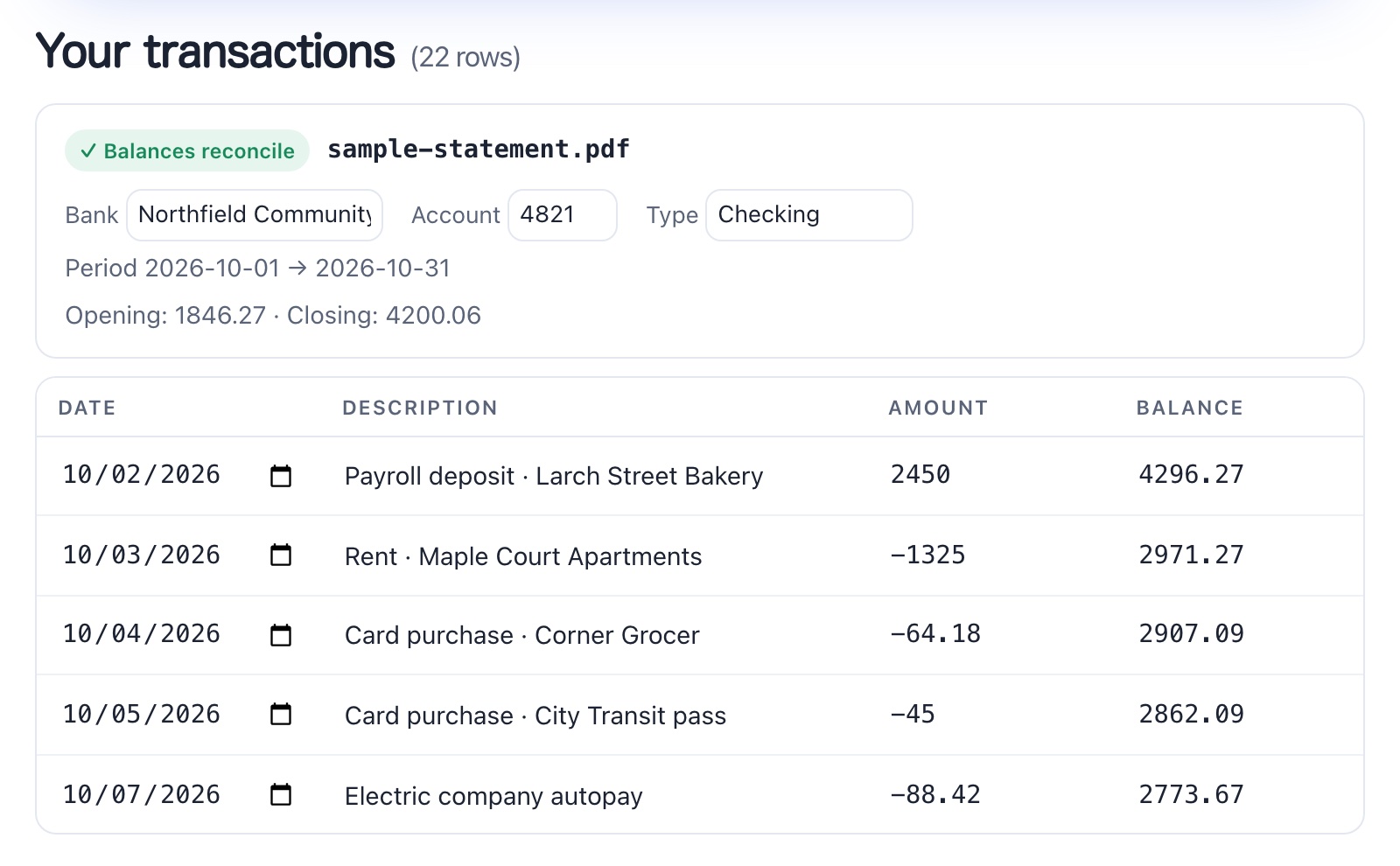
Every row is shown. Edit any cell, flip a sign, or delete a row. Money out is negative.
| Date | Description | Amount | Balance | Account | Source | Page | Actions |
|---|
.qbo is for QuickBooks. .ofx is for Xero, Quicken and most other accounting software.
When a statement prints an opening balance, a closing balance or a running balance, the converter adds up what it extracted and compares. If the numbers tie out, you see a green check. If they don’t, it tells you how many checks failed so you know where to look.
If a statement prints no balances, there is nothing to check against, and you’ll see a note saying so.
Most statement converters work the same way: you upload client statements to their servers and pay monthly for a page allowance. That suits a large firm. If you’re a solo bookkeeper, a preparer in tax season, or sorting your own accounts, here’s the difference.
| Statement Unpacker | Typical upload-based converter | |
|---|---|---|
| Where your statement goes | Nowhere. It never leaves your computer. | Uploaded to the vendor’s servers |
| Price | $19 once | Monthly subscription, often $20–80 a month |
| Page limits | None | A monthly page allowance; more pages cost more |
| Account and sign-up | None | Account, and usually a trial that ends |
| Try before paying | See every row of your own statement free | Trial, usually with a page cap |
| Balance check | Yes, shown per statement | Offered by the better ones |
| Scanned or photographed statements | Not supported | Often supported (OCR) |
| Direct QBO / OFX files | Yes: .qbo and .ofx, plus CSV and Excel | Often supported |
It doesn’t read scans or photos. For those, a tool with OCR is the better fit.
Any text-based bank or credit card statement, one or many. Password-protected files ask for the password, which stays in your browser.
See every transaction with its date, description, amount and balance. Fix anything by typing in the cell. The balance check tells you whether it ties out.
CSV, Excel (.xlsx), a QuickBooks .qbo file, or .ofx for Xero and Quicken. Merge a year of statements, from several banks and accounts, into one sheet with Bank and Account columns.
Catch-up and clean-up work when the client sends twelve PDFs and no bank feed. Client data stays on your computer.
Get a year of transactions into a workpaper in minutes instead of keying them. No per-page meter running during busy season.
Loan applications, budgeting, a spreadsheet for your accountant. Pay once and keep it for next year.
The PDF is opened and read in your browser’s memory. No uploads, no analytics, no tracking. Close the tab and it’s gone.
Want proof? Switch off your Wi-Fi once the page has loaded and convert a statement. It still works.
The only thing the site ever sends is your license key, to check it when you unlock.
Try it on your own statement first: the full preview is free, so you know it reads your bank’s layout before you pay anything.
$19 one-time
Get unlimited exportsYour license key arrives by email with your receipt. Paste it below.
No. The PDF is read and converted inside your browser. The only thing the site ever sends is your license key, to check it when you unlock.
Most likely. It reads the layout of the statement rather than relying on a list of banks. It has been checked on real statements from Chase, Bank of America and Capital One, and on test statements modeled on Wells Fargo, Citi, American Express, Discover, U.S. Bank, PNC and TD Bank. The full preview is free, so you can see whether it reads yours before paying. If a column comes out wrong, the “Fix the columns” button lets you correct it.
No. It needs a text-based PDF, which is what banks provide when you download a statement online. If you can select the text in the PDF with your cursor, it will be readable.
When the statement prints opening, closing or running balances, the converter checks that the extracted transactions add up to them and flags the statement if they don’t. You can also edit any cell before exporting. Always glance over the result before it goes into the books.
US and international: 01/31/2026, 31/01/2026, 2026-01-31, “Jan 31”, “31 Jan 2026”; amounts like 1,234.56 and 1.234,56; negatives written as −12.00, (12.00), 12.00- or 12.00 DR. Exports use YYYY-MM-DD dates and negative numbers for money out.
Yes. For QuickBooks, download the .qbo file and upload it on the bank transactions screen; there are no columns to map. For Xero, Quicken and most other software, use the .ofx file. A three-column CSV (Date, Description, Amount) is there too if you prefer mapping it yourself.
A full on-screen preview of every transaction from every file, and export of the first 15 rows. Paying removes the limit and adds merging.
Each purchase gets its own key, which activates on up to 2 browsers, for example your office and home computers. To move it, choose “Remove license from this browser” on the old one. Lost it? Email us.
Yes. It’s a web page, so it runs in a current version of Chrome, Edge, Safari or Firefox on Windows, macOS, Linux or an iPad. There’s nothing to install.
Yes, within 7 days if it doesn’t handle your statements. Email support.
By bank: Chase · Bank of America · Capital One · Wells Fargo · Citi · American Express · Discover · U.S. Bank · PNC · TD Bank · All banks